
SolTradingBot on Base
How to use SolTradingBot on Base

SolTradingBot supports Base token trading in its shared Telegram bot. The live Base order panel exposes market buy/sell, limit buy/sell, take-profit, stop-loss, trailing-stop and partial-exit controls.
SolTradingBot on Base: at a glance
- Market and limit buy/sell controls inspected on Base
- TP/SL, trailing stop and percentage-based partial exits
- Multi-wallet creation with separate Base balances
Before you trade: Exact Base fees and custody remain unverified. No funds were deposited and no trade was executed in the audit.
SolTradingBot on Base: quick answer
SolTradingBot is active on Base through Telegram. The verified Base panel offers swaps, limits and configurable exits. The platform fee ceiling is 1%, but an exact Base rate has not been confirmed. Keep ETH on the selected network for gas.
Verified: 28 October 2026 · Interface: Telegram · Network: Base · Gas asset: ETH on Base.
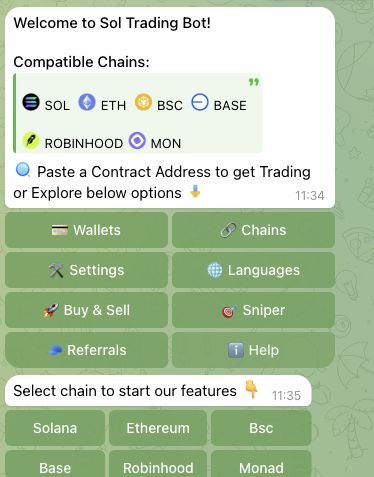
Current product networks: Solana, Ethereum, BNB Chain, Base, Robinhood Chain and Monad. The controls described below are scoped to Base.
Getting started with SolTradingBot on Base

Open SolTradingBot
Open the shared SolTradingBot Telegram bot and select Base. Confirm the network before entering a token contract.
Select Base before entering a token
Open the existing SolTradingBot referral entrypoint and select Base inside Telegram. Confirm the selected chain before pasting a token contract. During the 28 October 2026 walkthrough, an Aerodrome V3 label appeared beside a token-specific order form. This observation establishes a visible route and controls, not a completed trade or support for every market.
Interface language: English was observed in Telegram. Chinese, Russian, Portuguese and Vietnamese are advertised language options; their translated workflows were not tested.

Find the Base token
Use the correct Base token contract. The inspected USDC panel displayed an Aerodrome V3 route; that does not confirm every Base token or market.

Base order controls
Market and limit buy/sell, TP/SL, trailing stop and percentage-based partial exits were inspected on Base. Copy setup, DCA and sniping remain unverified.

Review the order
Review direction, amount, trigger, expiry, slippage and gas. Visible gas controls do not establish private routing or MEV protection.
Base order, fee and wallet details
Configure Base orders and exits
The current form offers Swap and Limit modes, limit buys and sells, percentage-based partial exits, TP/SL and trailing-stop settings. Review the direction, amount, trigger and expiry before placing an order. DCA is unverified. A Copy menu is present, but a menu alone does not confirm a working copy configuration. Sniping and Solana feature parity are unverified.
Read the trigger and exit size together: a percentage-based exit can close only part of a position, while a trailing stop changes its trigger as the tracked price moves. Those controls do not guarantee a fill at the displayed trigger. The retained Base form was inspected without funding or submitting an order.

Check your Base wallet
The wallet manager groups a Solana address and an EVM address per wallet bundle. Base has its own balance. Keep ETH on Base for gas; custody and exclusive key control remain unverified.
Use Base for both the token and the selected wallet network.
Wallets and funding on Base
The shared Telegram wallet manager groups a Solana address and an EVM address in each wallet bundle. EVM chains share an address within the bundle, while Base has a separate balance. Select the destination network carefully before any deposit. Multi-wallet creation is confirmed; custody, exclusive key control, external wallet connection and shared order history remain unverified. No funds were deposited and no orders were submitted in this audit.
If the wallet address matches another EVM chain but the Base balance is missing, check the network on both sides of the transfer. A shared address is not a shared balance or an automatic bridge. Keep any recovery information private; generated-wallet access does not establish exclusive custody.

Review fees
The platform fee ceiling is 1%; the exact Base rate remains unverified. Network gas and DEX/protocol costs are separate. Cashback and possible volume discounts are not a confirmed reduction to the quoted gross fee.
ETH network costs and platform fees
The product-wide platform fee ceiling is 1%; the exact Base rate remains unverified. Network gas, priority/tip where applicable, and DEX/protocol costs are separate. The Base interface exposes gas and manual slippage settings. A gas setting is not evidence of private routing or MEV protection. Mode-specific and referral-adjusted fees remain unverified.
Do not convert the 1% ceiling into a promised Base charge. A hypothetical $100 trade would have a $1 platform fee at exactly 1%, but the retained evidence does not establish that exact Base rate. Gas and route costs are separate, and this review has no funded Base fee receipt.
Compare SolTradingBot on Base
Data checked: 28 October 2026.
Sources and verification
The chain selector, token-specific order controls, settings and wallet manager were inspected on 28 October 2026. No funds were deposited and no trade was executed. The platform fee ceiling is user-confirmed; exact Base fees and custody remain unverified.
Official SolTradingBot · Official announcements · Solana guide and history · Base directory
SolTradingBot on Base: frequently asked questions
Is SolTradingBot available on Base?
Yes. The official multichain announcement and a live Base token order form were checked on 28 October 2026. Use the shared SolTradingBot Telegram bot and select Base before looking up a token.
What does SolTradingBot charge on Base?
The platform fee ceiling is 1%, but an exact Base rate has not been confirmed. Network fees and DEX/protocol costs are separate. Cashback is a rebate on paid fees, not proof of a lower gross trading rate. A volume discount or new-chain cashback adjustment has not been verified.
Which Base order types were verified?
The inspected token panel exposes market buy/sell, limit buy/sell, take-profit, stop-loss, trailing-stop and percentage-based partial exits. These are verified configuration controls; the audit did not place a funded order.
How do I open a limit order on Base?
Select Base, enter the correct token contract and choose Limit in the token panel. Select buy or sell, then review the amount, trigger and expiry. Sell controls include TP/SL and Trailing Stop. Review the current quote and network costs before submitting.
Can I use the same wallet across Base and other chains?
The Telegram wallet manager groups a Solana address and one EVM address per wallet bundle. EVM networks share that address within the bundle but have separate balances. A matching address does not make deposits transferable between networks; verify the selected network.
Does SolTradingBot support copy trading, DCA and sniping on Base?
The Base walkthrough did not establish a complete copy configuration, DCA creation or sniping workflow. A visible menu does not prove those functions are available. They remain unverified, rather than marked unsupported.
Is SolTradingBot a web terminal on Base?
The current Base trading surface verified in this audit is Telegram. A standalone web terminal was not verified. An advertised Solana extension does not establish extension support on other chains.